 stow
Your photos, safe on a drive you own.
STOW copies the original photos and videos to an SSD, USB-C flash drive or NAS and checks every single file. No cloud, no subscription, no account.
Download on the App Store- Every file verified (SHA-256)
- No account, no data collected
- Originals: HEIC, RAW, Live Photos, video
- Pro once, no subscription
Your phone is full. iCloud bills you every month. And a lifetime of memories lives in one place.
STOW gives you a real copy on your own drive, to keep in a drawer, at the office or at your parents'. Your photos stay yours, whatever phone, account or plan you have next.
Three steps, then STOW takes over
Plug in a drive
An SSD, a USB-C flash drive or your home NAS through the Files app.
Choose what to save
A date range, photos or videos only, or just the photos you pick.
STOW copies and verifies
It reads back every file and compares it with the original. Next time, only what's new.
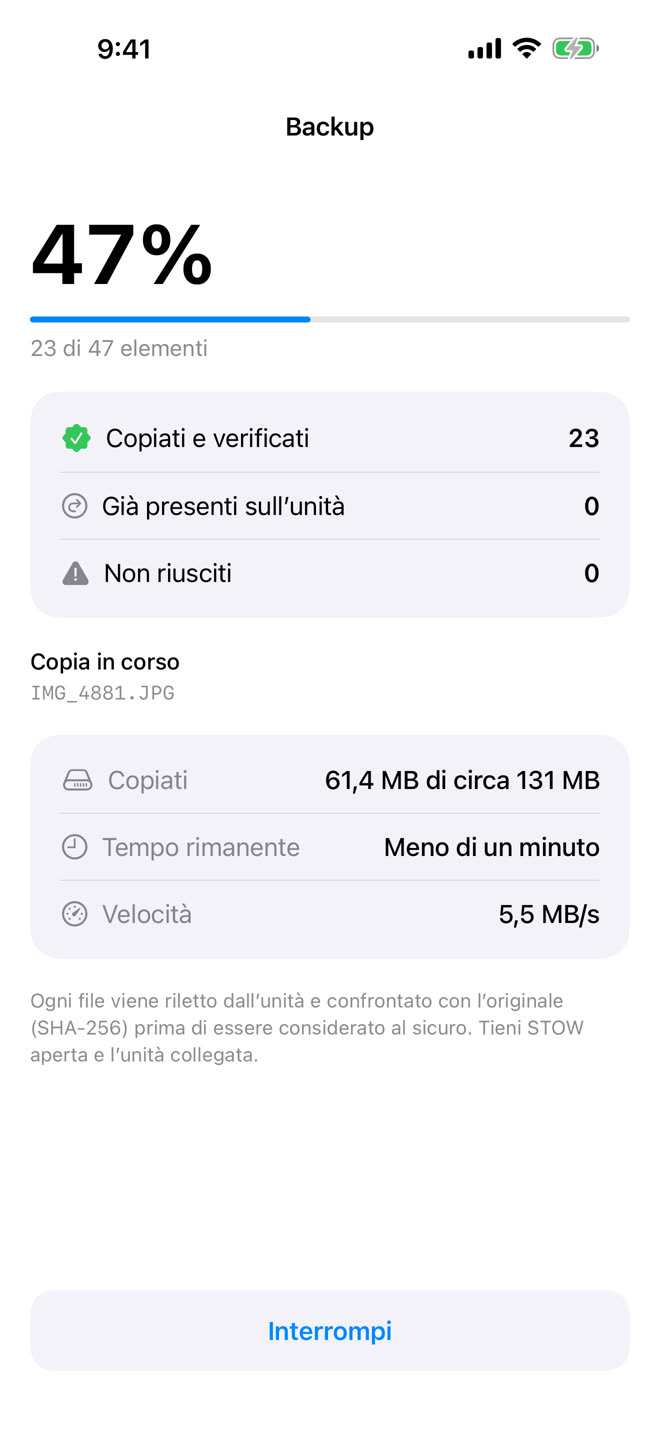
Every file verified
A copy isn't a backup until it's been checked. STOW reads every file back from the drive and compares it with the original using a SHA-256 fingerprint. If anything is off, it tells you why.
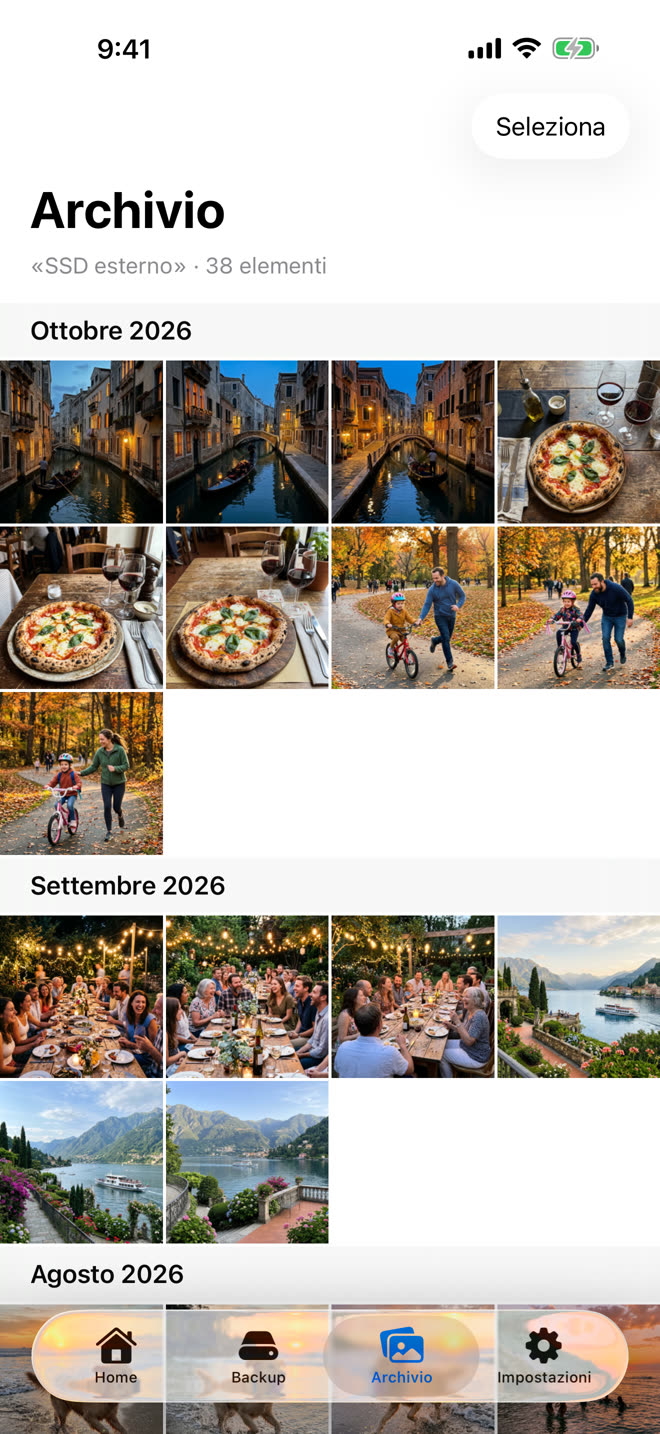
Browse your archive like Photos
Month by month, full screen, with Live Photos that come alive. Need a photo back? "Bring back to Photos" returns it to your library with its original date and name.
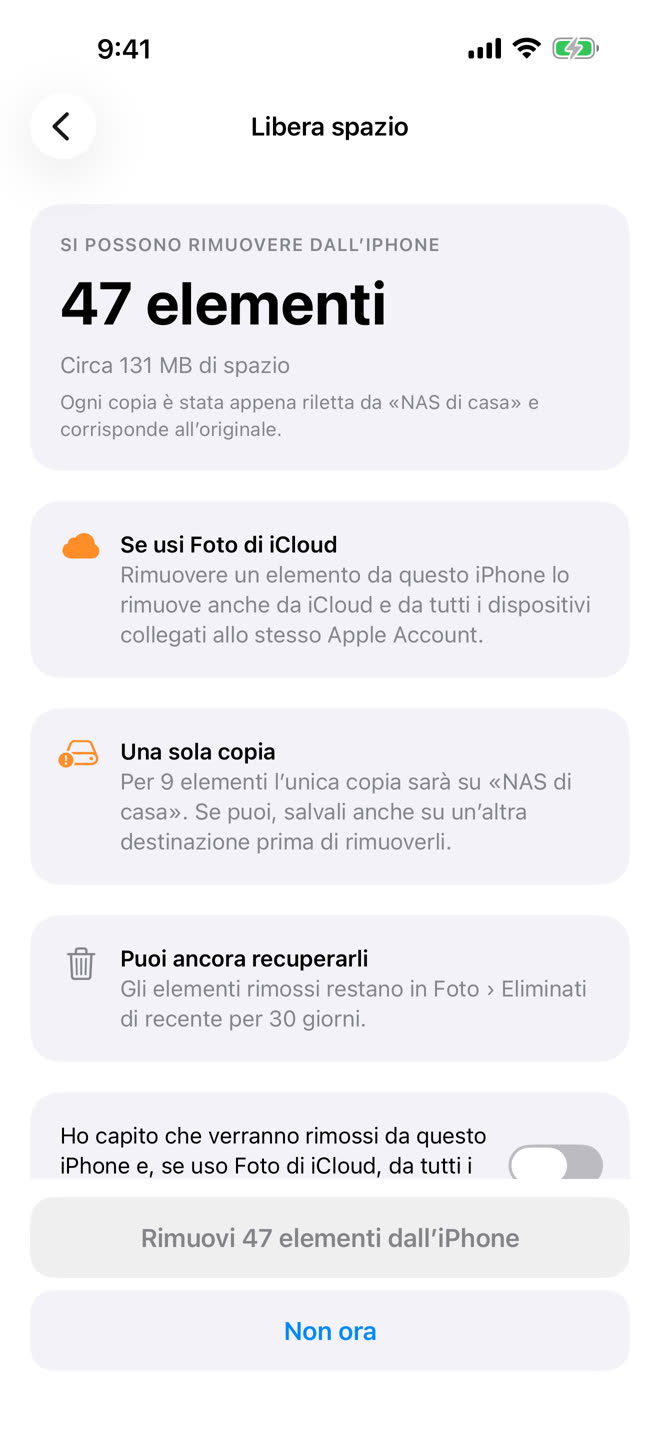
Free up space without fear
Once the backup is verified, STOW re-checks the copies on the drive and offers to remove from your iPhone only what is truly safe. Photos edited after their last backup stay, and iOS always asks one last time.
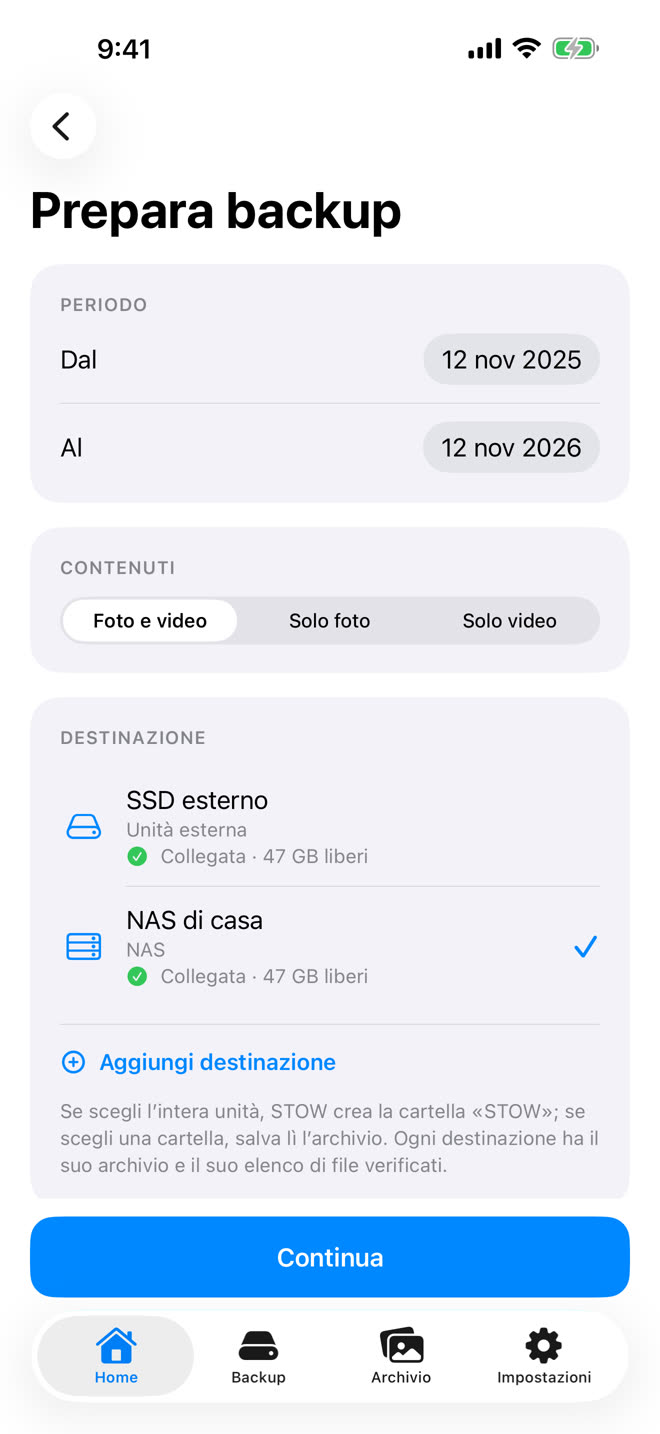
SSD, flash drive or NAS
Use the drive you already have. Each destination keeps its own archive, organised by year and month, readable on any computer, even without STOW.
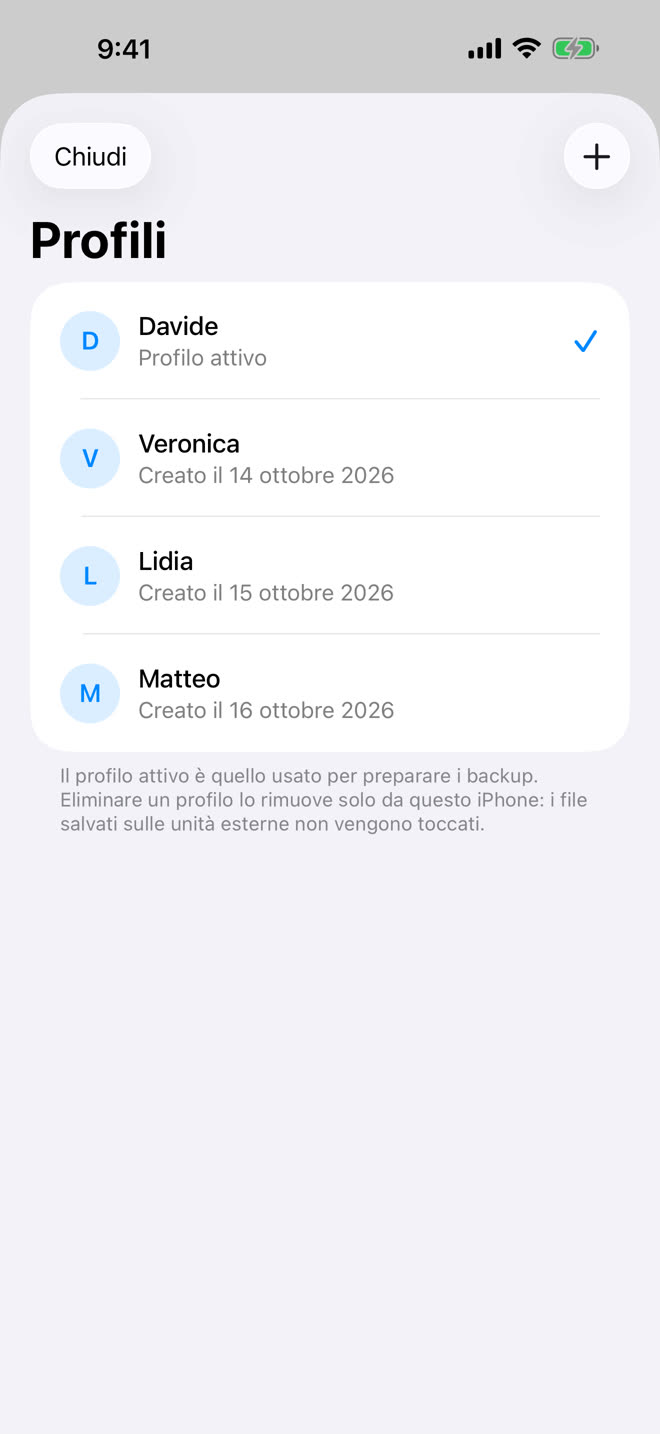
An archive for everyone
The whole family on one drive, each with their own folder. New iPhone? Restore your profile from the archive without copying anything again.
And everything you expect from a backup done right
Resumes where it stopped
Unplugged drive or dropped connection? It carries on without copying twice.
Search "dog" or "beach"
With Apple's image analysis, right on your iPhone (Pro).
No duplicates
Identical photos are recognised and stored once.
Works offline
No servers: photos go from your phone to your drive, that's it.
STOW or the cloud?
| STOW | Cloud | |
|---|---|---|
| Where your photos are | On your own drive | On a company's servers |
| What it costs | Free, Pro once | Every month, forever |
| File checks | Every file, SHA-256 | You can't see them |
| Needs internet | No | Yes |
| Data collected | None | Depends on the service |
The cloud is great for syncing. STOW is the copy that stays yours: they work well together.
Free forever. Pro, once.
STOW
- Verified backup to SSD, flash drive or folder
- Incremental backup and resume
- Archive gallery and Live Photos
- Bring back to Photos
- History and profile restore
STOW Pro
- Free up iPhone space
- Search photos with Apple's AI
- NAS and multiple drives
- A profile for everyone
- Shared with Family Sharing
Frequently asked questions
Does STOW delete photos from my iPhone?
Only if you ask, with "Free up space". It first re-checks the copies on the drive, then needs your confirmation and iOS's. A photo edited after its last backup stays on your iPhone until the edit is saved, and removed ones stay 30 days in Recently Deleted. If you use iCloud Photos, removing them from your iPhone also removes them from iCloud.
What drive do I need?
A USB-C SSD or flash drive (or with a Lightning adapter), formatted exFAT or APFS: FAT32 can't hold videos over 4 GB. A Files app folder or a NAS connected with "Connect to Server" works too.
Can I open the photos without STOW?
Yes. They're the original files (HEIC, JPEG, RAW, MOV) in year and month folders, readable on Mac, PC and the Files app.
What about photos I edited?
STOW saves the original and your latest edit, with the edit file (.AAE), the way Photos exports them: IMG_1234.HEIC and IMG_E1234.HEIC. In the archive you see the photo as in Photos, and the original is always there to go back to. If you edit it again, the next backup saves the new version in place of the previous one.
What if a backup is interrupted?
STOW stops with the right reason and resumes exactly where it left off, without copying what's already safe. On iOS 26 it can keep going when you leave the app.
Do I need an account or a subscription?
No. STOW has no accounts and no subscriptions. STOW Pro is bought once and works for your family with Family Sharing.
What does STOW know about me?
Nothing: no data collection, no analytics or tracking, nothing sent to servers. Even photo search runs on your iPhone.
How do I delete a profile and my data?
In Profiles, swipe on the profile and tap "Delete": STOW erases the profile, its history and the data it keeps for it from your iPhone. The photos and videos on the drive stay where they are, in the profile's folder, and you can bring the profile back any time with "Restore from an archive". Deleting the app erases everything STOW keeps on your iPhone.
Does it work with iCloud Photos?
Yes. Originals stored only in iCloud are downloaded during the backup and then copied to the drive.
Is the app in English?
Yes. STOW speaks English and Italian, and follows your iPhone’s language.
Keep your photos safe. Today.
Download STOW for free and make your first verified backup in minutes.
Download on the App StoreSupport
Questions, problems or ideas? Write to hellodave@espertini.com with your iPhone model, iOS version and, for a backup, the kind of drive.